

Integrating radiology and lab services within a single specialty clinical setting is defined as the unified management of diagnostic imaging orders, laboratory test requests, results delivery, and clinical data within one connected workflow. The industry term for this is integrated diagnostics, and it applies directly when you integrate radiology lab single specialty operations under one coordinated system. Standards like HL7 and DICOM interoperability form the technical backbone of any successful integration. Per 2022 CMS data, medical practices generate between $60 and $330 in additional lab revenue per patient annually by bringing diagnostic testing onsite. Kohealth Labs delivers this kind of unified diagnostic capability through a single-contract model that connects laboratory services, radiology, and AI-driven data quality in one place.
What are the prerequisites for integrating radiology and lab services?
Successful radiology lab integration starts with your EMR or EHR platform. The system must support bi-directional HL7 messaging to automate both outbound orders and inbound results without manual transcription. Orders carry ICD-10 codes, fasting status, and specimen routing instructions. Results post directly to the patient chart.
Radiology imaging data follows a different standard. DICOM governs how imaging files are stored, transmitted, and linked to patient records inside a Picture Archiving and Communication System (PACS). Your EMR must map to both HL7 and DICOM to maintain chart integrity across lab and imaging workflows.

Key hardware and software requirements
Before you begin any interface development, confirm your environment covers these foundations:
- EMR/EHR platform with certified HL7 2.x or FHIR support and DICOM viewer integration
- Laboratory Information System (LIS) capable of sending ORU (result) messages and receiving ORM (order) messages
- Radiology Information System (RIS) linked to PACS for image storage and report delivery
- Secure network infrastructure with role-based access controls and audit logging
- Specimen routing protocols that define collection points, transport steps, and turnaround expectations
| Interface standard | Primary use | Data type handled |
|---|---|---|
| HL7 v2.x ORM | Lab and radiology order transmission | Text orders with clinical context |
| HL7 v2.x ORU | Result delivery to EMR | Structured lab results |
| DICOM | Imaging file storage and retrieval | Images and radiology reports |
| FHIR R4 | Modern API-based data exchange | JSON/XML clinical resources |
Pro Tip: Run an Ask-On-Order Entry (AOE) audit before you build any interface. AOE questions capture specimen type, fasting status, and clinical context at the point of ordering. Missing or inconsistent AOE answers are the single most common cause of unstructured data in integrated EMR charts.
How to execute the integration process step by step
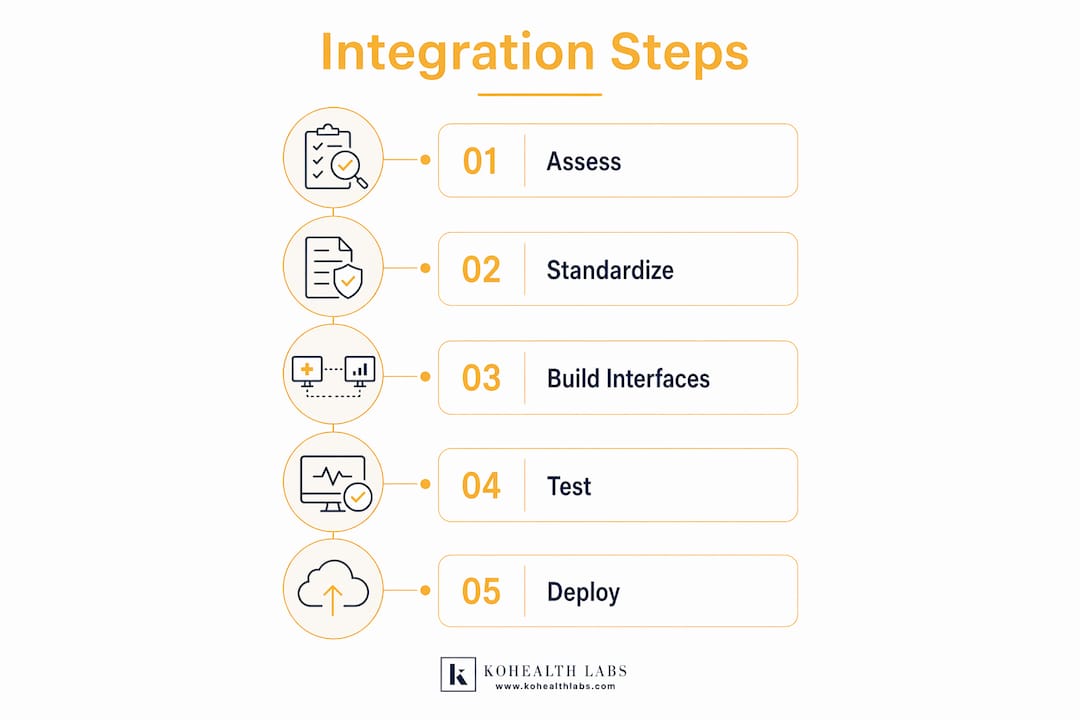
A structured rollout protects data quality and prevents workflow disruptions. The steps below apply directly to single specialty clinics integrating lab and radiology under one system.
-
Define the clinical scope. List every lab test type and imaging modality your specialty uses. Map each to the ordering provider, the receiving system (LIS or RIS), and the expected result format.
-
Select your integration vendor or team. Your EMR vendor, a third-party integration engine (such as Mirth Connect or Rhapsody), or a full-service partner like Kohealth Labs can build and maintain the interfaces. Evaluate each option based on your volume, specialty complexity, and internal IT capacity.
-
Develop and configure interfaces. Build the HL7 ORM/ORU message flows between your EMR and LIS. Build the DICOM worklist and report interfaces between your EMR and RIS/PACS. EMR integration with LIS and RIS allows automatic transmission of both lab orders and imaging requests within a single unified workflow.
-
Standardize clinical workflows. Define AOE question sets, specimen collection procedures, and imaging order protocols before go-live. Workflow standardization is more important than the technology itself. Skipping this step produces incorrect or incomplete EMR data that no interface can fix after the fact.
-
Test in a staging environment. Send test orders through every order type. Confirm results return to the correct chart location with the correct patient identifiers. Test edge cases: canceled orders, amended results, and stat requests.
-
Train clinical and administrative staff. Cover order entry, result review, exception handling, and escalation paths. Staff who understand the workflow logic catch errors before they reach the patient chart.
-
Go live with phased activation. Start with one order type or one provider group. Expand after confirming data quality and turnaround times meet your targets.
- Assign a dedicated integration lead for the first 30 days post go-live
- Set daily result reconciliation checks between LIS output and EMR chart entries
- Document every interface error and its resolution for your quality improvement log
What are the common challenges during radiology and lab integration?
The most frequent failure point is data standard mismatch. Lab systems speak HL7. Radiology platforms speak DICOM. Your EMR must support both standards simultaneously, with bi-directional mapping that preserves chart integrity for every transaction.
Workflow misalignment is the second major risk. Failing to standardize clinical workflows before building the interface produces unstructured or incorrect EMR data. A lab order placed without a required AOE answer, or an imaging request missing a clinical indication, creates downstream errors that affect both billing and clinical decision-making.
Common challenges and their corrective actions:
- Duplicate patient records: Implement a Master Patient Index (MPI) before integration to match identities across LIS, RIS, and EMR
- Result routing errors: Map every result type to a specific chart location and provider inbox during interface configuration
- Specimen labeling failures: Standardize label formats and barcode types across all collection points before go-live
- Imaging report delays: Set PACS-to-EMR transmission triggers at report sign-off, not at image acquisition
- Staff workarounds: Audit order entry behavior weekly in the first 60 days to catch manual processes that bypass the interface
"The biggest integration failures we see are not technology failures. They are workflow failures. A well-built interface on top of an unstandardized clinical process will produce bad data at machine speed. Fix the process first, then build the interface."
Pro Tip: Build a regression test library during your staging phase. Every time you update your EMR or LIS, run the full test library before deploying to production. Interface breaks after software updates are the leading cause of result delivery failures in integrated specialty clinics.
How does integrated diagnostics improve clinical and operational outcomes?
Integrated radiology and lab diagnostics directly improve clinical decision-making speed. When a radiologist identifies an incidental finding on imaging, the treating physician can immediately cross-reference current lab values in the same chart view. That correlation reduces the time between finding and treatment decision.
Radiology and lab services now drive coordinated care and value-based pathways, expanding well beyond volume metrics. Integration stabilizes revenue and accelerates treatment planning. That shift matters for specialty practices competing on quality metrics and patient retention.
The financial case is equally clear. Practices that bring diagnostic testing onsite generate between $60 and $330 in additional lab revenue per patient annually. That range reflects specialty type and testing volume, but even the lower end represents meaningful recurring revenue for a single specialty clinic.
Key outcome improvements from full integration:
- Fewer manual transcription errors because orders and results move automatically through HL7 and DICOM interfaces
- Faster result turnaround because LIS and RIS transmit results directly to the EMR at sign-off
- Better patient experience because one visit covers both imaging and lab needs without referral delays
- Stronger wellness program design because integrated lab and radiology data identifies health risks earlier and supports preventive care planning
- Improved compliance because structured data in the EMR supports audit-ready documentation for value-based care contracts
Wellness programs that combine laboratory biomarkers with imaging assessments report higher health outcomes and better cost control. The role of radiology in wellness program design is expanding precisely because imaging biomarkers and lab values together reveal risks that neither source identifies alone.
Key Takeaways
Integrating radiology and lab services in a single specialty clinic requires standardized clinical workflows, dual-standard EMR support for HL7 and DICOM, and a phased go-live strategy to protect data quality and revenue.
| Point | Details |
|---|---|
| Standardize workflows first | Define AOE questions and specimen routing before building any interface to prevent EMR data errors. |
| Support both HL7 and DICOM | Your EMR must map to both standards simultaneously to handle lab and imaging data correctly. |
| Phase your go-live | Activate one order type or provider group first, then expand after confirming data quality. |
| Financial benefit is measurable | Onsite integrated testing adds $60–$330 in lab revenue per patient annually per CMS data. |
| Integration drives coordinated care | Unified diagnostics support value-based care contracts and faster clinical decision-making. |
The integration lesson most specialty clinics learn too late
At Kohealth Labs, we have seen the same pattern repeat across specialty practices that attempt integration without a structured plan. The technology gets built first. The workflows get addressed second, or not at all. The result is a technically functional interface that produces clinically unreliable data.
The practices that get integration right treat workflow standardization as a clinical project, not an IT project. They assign a physician champion who owns the order entry protocols. They audit AOE completion rates before go-live. They run result reconciliation checks daily for the first month. These are not complex steps. They are disciplined ones.
The role of integrated radiology in polyclinic operations and single specialty settings is shifting from a back-office function to a front-line clinical asset. When lab values and imaging findings live in the same chart, care teams make faster and more confident decisions. That is the outcome integration is supposed to deliver, and it is achievable when you build the process before you build the interface.
The specialty clinics that partner with an experienced integration team reach that outcome faster. They avoid the six-month troubleshooting cycles that follow a poorly planned go-live. They also build a data foundation that supports value-based care contracts, wellness programs, and clinical research participation. Integration is not a one-time project. It is a clinical infrastructure decision that compounds in value over time.
— Kohealth Labs
Kohealth Labs and integrated diagnostics for specialty practices
Kohealth Labs connects laboratory services and radiology under one contract, giving specialty practices a direct path to unified diagnostic workflows without managing multiple vendors.
Kohealth Labs supports bi-directional interfaces with major labs and imaging centers, covering over 100 biomarkers and AI-driven data quality checks that flag deviations before they reach the patient chart. The single-contract model reduces administrative complexity and cuts turnaround time on analysis-ready data bundles. For specialty practices building toward value-based care or clinical research participation, Kohealth Labs provides the integrated clinical diagnostics infrastructure that supports both. Reach out to learn how Kohealth Labs can support your practice's diagnostic integration goals.
FAQ
What does it mean to integrate radiology and lab in a single specialty clinic?
It means connecting your LIS, RIS, and EMR so that lab orders, imaging requests, and results all flow automatically through HL7 and DICOM interfaces within one clinical workflow. The goal is eliminating manual transcription and unifying diagnostic data in a single patient chart.
What is the biggest risk when integrating lab and radiology systems?
The biggest risk is building the interface before standardizing clinical workflows. Unstandardized AOE questions and specimen routing produce incorrect EMR data that no interface can correct after the fact.
How does radiology integration support wellness programs?
Integrated lab and radiology data identifies health risks earlier by combining imaging biomarkers with lab values. Organizations that integrate lab testing into wellness programs report higher health outcomes and better healthcare cost control.
What financial benefit does onsite diagnostic integration provide?
Per 2022 CMS data, practices generate between $60 and $330 in additional lab revenue per patient annually by bringing diagnostic testing onsite. The exact amount depends on specialty type and testing volume.
How long does a typical radiology and lab integration take?
Timeline varies by EMR platform, interface complexity, and workflow readiness. Most single specialty clinics complete interface development, testing, and go-live within three to six months when clinical workflows are standardized before the build begins.