

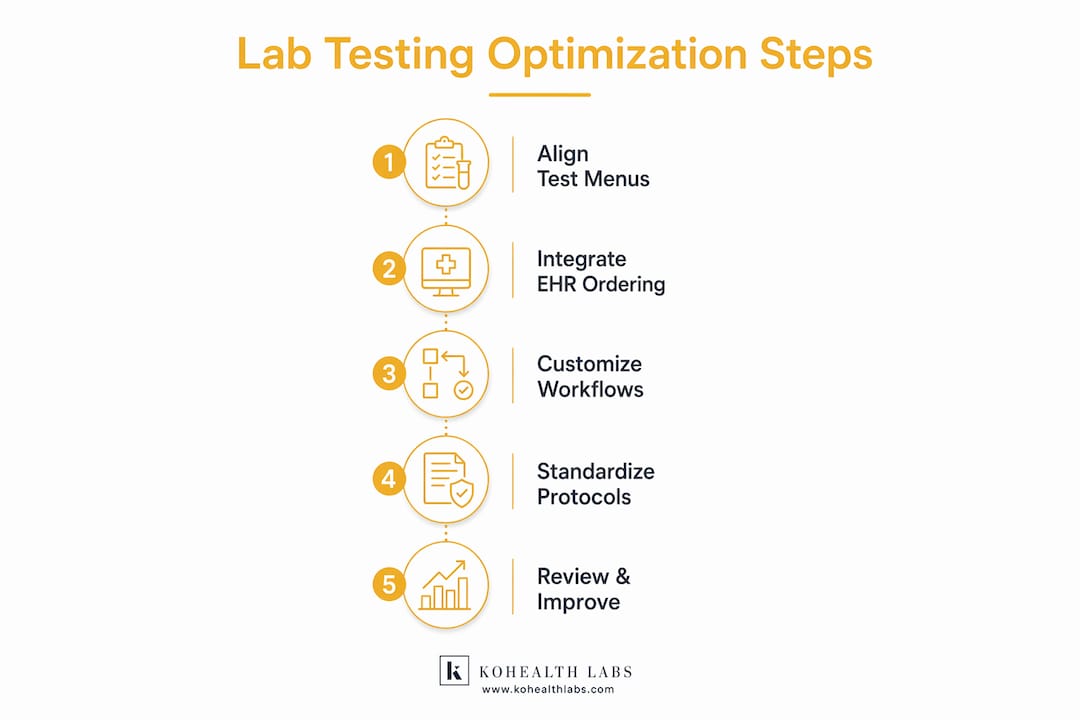
Lab testing optimization is the process of aligning test menus, ordering workflows, and staffing roles to the specific clinical needs of a single-specialty practice. When done well, it reduces wasted staff time, cuts unnecessary costs, and produces faster, more reliable results for patients. Only 1 in 5 practices operate their own labs despite diagnostic data driving roughly 70% of all medical decisions. That gap represents a significant missed opportunity. Kohealth Labs works with specialty practices to close it through integrated diagnostics, single-contract models, and AI-assisted quality control.
How can integrating lab ordering into EHR workflows optimize lab testing in a single-specialty practice?
EHR-lab integration is the single most effective first step for any specialty practice looking to improve lab efficiency. When ordering happens inside the EHR rather than through a separate portal or paper form, staff eliminate redundant data entry and reduce the chance of transcription errors. One AMA-documented implementation showed that EHR-integrated specialty ordering saved over 600 staff hours in nine months. Order placement time dropped by 70%, and at-home screening adherence rose by 45%. Those are not marginal gains. They represent a structural shift in how a practice operates day to day.
The key is building integration features that match how your specialty actually works. A dermatology practice needs different defaults than a cardiology group. The following features drive the most measurable improvement:
- Specialty-specific order sets that surface the 10–15 most common tests with a single click
- Automated code validation that checks orders before they leave the system
- Real-time clinical decision support that flags duplicate or contraindicated orders
- Direct result routing back into the patient chart without manual import
- Audit trails that track who ordered what and when for compliance purposes
Pro Tip: Build your order sets around your top 10–15 tests by volume. Physicians who see only their specialty-relevant tests report faster ordering and fewer errors than those navigating a full lab directory.
What operational strategies help customize lab testing for single-specialty practices?
Generic lab interfaces create friction. When a rheumatologist has to scroll past hundreds of irrelevant tests to find an ANA panel, ordering slows down and errors increase. Office-specific test panels tailored to 10–15 common specialty tests reduce navigation fatigue and measurably cut order errors. Specialty-aligned configurations also shorten training time for new staff, because the system reflects how the practice actually works.

Customization goes beyond the test menu. Role demarcation matters just as much. Clinicians should focus on clinical decisions, while medical assistants handle specimen collection and routing. Lab technicians manage processing and quality checks. When each role has a defined lane, handoffs become faster and accountability becomes clearer.
| Feature | Generic panel | Customized panel |
|---|---|---|
| Test relevance | Low, broad catalog | High, specialty-specific |
| Ordering speed | Slow, requires search | Fast, single-click access |
| Error rate | Higher due to navigation | Lower with targeted defaults |
| Staff training time | Longer | Shorter |
| Physician adoption | Lower | Higher |
Pro Tip: Review your top 20 ordered tests each quarter. Remove tests that rarely return actionable results for your specialty. A leaner panel keeps ordering fast and focused.
Centralized diagnostics also play a direct role in workflow quality. Centralized lab workflows reduce the number of handoffs between systems, which is where most errors and delays occur in single-specialty settings.
Which resources and automation tools are essential for lab testing optimization?
The right tools remove manual steps without requiring a large IT investment or new hires. Modern physician office lab (POL) setups use AI co-pilots and simplified laboratory information systems (LIS) to let existing medical assistants handle accessioning and quality control. AI-powered co-pilots allow existing staff to manage lab tasks without extensive new training. That directly reduces the need to hire dedicated lab personnel while maintaining result accuracy.
Automation also addresses one of the most persistent cost drivers in specialty labs: manual order entry errors. Automated clinical decision support, built into the ordering workflow, prevents downstream administrative work caused by incorrect or incomplete orders. Catching errors before the order leaves the system is far cheaper than correcting them after the fact.
Decentralized testing adds another layer of value. Rapid point-of-care results influence patient management decisions in real time, reducing unnecessary referrals and follow-up visits. The cost savings come not just from cheaper reagents but from shorter care cycles.
Core tools for a well-functioning specialty lab include:
- LIS (Laboratory Information System): manages specimen tracking, result entry, and reporting
- EHR-integrated ordering module: connects ordering directly to the patient record
- AI quality control software: flags result outliers and deviations before sign-off
- Automated billing interface: links test codes to CMS-compliant billing without manual entry
- Point-of-care analyzers: deliver rapid results for high-volume specialty tests on-site
How does standardizing lab testing processes improve scalability and reduce costs?
Standardization is a growth strategy, not just an operational preference. When all staff follow the same testing protocols, use the same result templates, and apply the same quality thresholds, the practice can scale without proportionally increasing management overhead. Lab standardization across sites reduces complexity, lowers error rates, and increases workforce flexibility. A staff member trained on a standardized system can step into any role or location without retraining.
Transitioning from outsourced to in-office testing also changes the revenue picture. Practices that bring testing in-house generate $60–$330 more revenue per patient annually compared to those that send all specimens out. That figure compounds quickly across a busy specialty panel.
| Operational area | Without standardization | With standardization |
|---|---|---|
| Error rate | Variable, staff-dependent | Consistent, protocol-driven |
| Training time | Long, role-specific | Shorter, transferable |
| Scalability | Limited by individual knowledge | Supported by shared systems |
| Billing accuracy | Inconsistent | Aligned with CMS coding standards |
| Quality control | Ad hoc | Systematic and auditable |
Practices that structure diagnostics as a contractable service line, rather than a cost center, see the most dramatic valuation gains. Structuring diagnostics as contractable assets can shift a practice's EBITDA multiple from the 3–5x range to 8–12x. That is not a theoretical benefit. It reflects how acquirers and health systems value predictable, scalable diagnostic revenue.
What are common challenges and troubleshooting tips when optimizing lab testing?
The most common failure point in lab optimization is not technology. It is change resistance from clinical staff who are comfortable with existing workflows. Physicians and medical assistants who have ordered tests the same way for years will push back on new systems, even when those systems are faster. The solution is not a mandate. It is a phased rollout with visible wins early, such as showing staff how much time they save in the first week.
Order entry errors are the second most frequent problem. Most downstream administrative work traces back to manual order entry mistakes that automated decision support could have caught. Practices that skip validation tools pay for it in billing corrections, rejected claims, and repeat specimen collections.
Common mistakes and corrective actions:
- Skipping staff training on new order sets: Run a 30-minute hands-on session before go-live, not after.
- Building panels that are too broad: Limit each specialty panel to 15 tests maximum to preserve speed.
- Ignoring result routing configuration: Confirm that results auto-populate the correct chart section before launch.
- Failing to audit order accuracy monthly: Set a recurring review to catch drift in ordering patterns early.
- Underestimating integration testing time: Allow at least two weeks for EHR-LIS interface testing before full deployment.
Pro Tip: Assign one clinical champion per department to own the new workflow during the first 90 days. Peer-to-peer adoption is faster and more durable than top-down mandates.
Integrated reporting also supports quality at scale. Specialty lab reporting that feeds directly into the clinical record reduces the chance of results being missed or acted on too late.
Key Takeaways
A single-specialty practice that integrates EHR ordering, customizes test panels, and standardizes protocols across roles will reduce costs, cut errors, and generate measurably more revenue from its diagnostic services.
| Point | Details |
|---|---|
| EHR integration saves time | Integrated ordering cut placement time by 70% and saved over 600 staff hours in nine months. |
| Custom panels reduce errors | Specialty-specific panels with 10–15 tests lower ordering errors and shorten staff training. |
| AI tools extend staff capacity | AI co-pilots let existing staff handle quality control without additional hiring. |
| Standardization enables growth | Uniform protocols reduce error rates and support scaling without proportional cost increases. |
| In-house testing adds revenue | Bringing testing in-office generates $60–$330 more revenue per patient annually. |
The case for treating diagnostics as a clinical asset
At Kohealth Labs, we have seen a consistent pattern across single-specialty practices: the ones that treat diagnostics as a core clinical asset outperform those that treat it as a back-office function. The difference is not about having the most advanced equipment. It is about building workflows where every test ordered has a clear purpose, a defined path, and a measurable outcome.
What we find most underappreciated is the role of the single-contract model in simplifying specialty billing. When a practice manages multiple lab vendors, billing complexity multiplies. Each vendor has different coding requirements, different turnaround expectations, and different data formats. Consolidating under one contract does not just reduce administrative friction. It creates a cleaner data trail that supports both compliance and revenue cycle management.
The future of lab testing in specialty practices runs through AI-assisted quality control and integrated radiology. Practices that combine lab data with imaging data under one reporting structure will have a significant advantage in both clinical decision-making and contract negotiations with payers. We believe that advantage compounds over time, and the practices that build it now will be far harder to displace later.
— Kohealth Labs
How Kohealth Labs supports specialty practice lab workflows
Kohealth Labs provides integrated clinical diagnostics that combine laboratory services, radiology, and AI-driven data quality into a single contract. For single-specialty practices, that means fewer vendors, faster turnaround, and cleaner data without adding staff or IT complexity.
The single-contract model covers over 100 biomarkers and routes analysis-ready data bundles directly to your clinical team. AI monitoring flags deviations before results reach the clinician, which protects both patient safety and billing accuracy. If your practice is ready to reduce diagnostic costs and build a more reliable testing workflow, explore Kohealth Labs' specialty solutions to see how integrated diagnostics fit your clinical model.
FAQ
What does it mean to optimize lab testing in a single-specialty practice?
Lab testing optimization means aligning test menus, ordering workflows, and staffing roles to the specific clinical needs of one specialty. The goal is faster results, fewer errors, and lower per-test costs.
How does EHR-lab integration reduce administrative burden?
EHR-integrated ordering eliminates manual data entry and automates code validation before orders are sent. One documented implementation saved over 600 staff hours in nine months and reduced order placement time by 70%.
What is the financial benefit of in-office lab testing?
Practices that bring testing in-house generate $60–$330 more revenue per patient annually compared to those that outsource all specimens. That gain comes from capturing the margin that would otherwise go to a reference lab.
How does a single-contract lab model simplify specialty billing?
A single-contract model consolidates coding requirements, data formats, and turnaround expectations under one vendor relationship. That reduces billing errors, speeds up claims processing, and creates a cleaner audit trail for compliance.
Can existing staff manage an optimized lab without new hires?
Yes. AI co-pilots and simplified LIS platforms allow existing medical assistants to handle accessioning and quality control without extensive new training, which removes the need to hire dedicated lab personnel in most single-specialty settings.